I'm Sohel Parvez, a Seasoned Freelancer Focusing on Local Search Marketing and WordPress Optimization. I Enjoy Working with Local Businesses and Help Grow Their Online Presence. I Increase the Local Business Visibility in Search Engines and Establish Brand Awareness.
When You Search for Something on Google Even Generic Search Queries, Google Frequently Triggers Map-Driven Local Business Listings, Delivering Users a Selection of the Most Relevant Local Businesses, While Dominating the Coveted First Page of Search Engine Results.
You May Find That Your Business Doesn’t Show Up for Relevant Searches in Your Area. to Maximize How Often Users Find Your Business in Local Search Results, Ensure That Your Business Information in Google My Business Is Accurate, Complete, and Engaging.
These Days, Your Consumers Are Going Online to Find You. Local Search Engine Optimization Is Simply One of the Ways to Position Yourself to Generate More Leads from the Internet.
Your Business Citations Typically Appear in Directories and Other Website Resources That Search Engines Use to Determine the Accuracy and Relevance of Your Business Location. the Most Authoritative Google Map Citations for Local Seo Are Those That Are Consistent with Your Google Business Page.
How Does a Citation Affect Your Search Engine Rankings?
Citations Help Internet Users to Discover Local Businesses and Can Also Impact Local Search Engine Rankings. Local Businesses Can Actively Manage Many Citations to Ensure Data Accuracy.
The Most Authoritative Google Map Citations for Local Seo Are Those That Are Consistent with Your Google Business Page. the Way You Publish Your Business Name, Address, and Phone Number (Nap) on External Websites and Directories Should Be an Exact Match to the Nap on Your Google Business Page. Listen to Our Recent Podcasts on Citation Distribution.
Where Can I Find a Local Business Citation?
as I Already Mentioned, a Local Citation Is Any Online Mention of the Name, Address, and Phone Number of a Local Business. Citations Can Occur on Local Business Directories, on Websites and Apps, and on Social Platforms. Citations Help Internet Users to Discover Local Businesses and Can Also Impact Local Search Engine Rankings.
What About Local Business Directories?
There Are Many Prominent Local Business Directories Online, with Business Citation Opportunities You Do Not Want to Miss. in Fact, There Are Over 200 Local Online Business Directories Offering Free Listings to Your Business. Adding Your Business to These Online Directories Is Certain to Improve Both Local and Organic Search Results, and Is Highly Recommended.
I've Accumulated Years of Local Business Citation Building Experience for Various Countries Included but Not Limited to the USA, Canada, Uk, & Australia.
I Create a Local Business Directory Listing with Consistent Nap and Full Business Information Without Any Error. I Create Citations Manually and Personally So Your or Your Client's Information Is Fully Secured.
First of all, the search engine isn’t going to rank your site overnight; it’s takes hard work and time. But the question is, Where do you focus all your energy when you’re trying to improve the SEO ranking of your website?
There are certain areas you can work to increase your chances of getting ranked fast. Let’s take a look at some of the best SEO techniques that can help you improve your search rankings in 2019.
10 SEO Techniques to Improve Your Site Rankings Fast.
1. Improve your page loading speed: Your page loading time is important for a few reasons. First of all, if your load speed is too slow, Google will recognize this, and it will harm your ranking. But a slow website will also impact the way your website visitors engage with your pages.
As a result, those negative interactions will hurt your ranking too. So, make your site fast.
2. Useful, high quality, relevant content: When you provide useful content, visitors tend to stay longer on your website to consume the information and therefore increase the dwell time. “Dwell time” is the amount of time visitors spend on your website and it can affect SEO ranking.
3. Optimize site images: Besides image file format and sizing, there are other ways to make sure your images are working hard for you on the SEO front. You can signal relevancy of your content to search engines by using keywords for your image file name, alt tag, title, description, and caption.
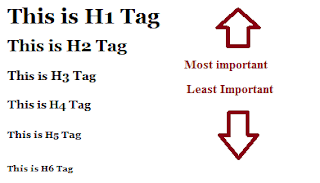
4. Break up your content with header tags: Headings are another way to help improve the user experience on your website. They break up the content and make it easier to read or skim. Plus, headers make everything look more appealing, which is always beneficial.
If your website is just a wall of text, it’s going to discourage people from spending a long time on it. Proper use of header tags can help break up your content into sections that are easier to read and utilize.
5. Keep Updating Old Content: To make the most out of your content, go through your older blog posts. Are any of the topics that you have written about still relevant? For example, perhaps you wrote about the best SEO techniques two years ago. But since then, Google announced major changes to its algorithm. Then you need to update your article.
5. Outbound links: To make your content more useful and relevant, you can link out to authority sites for more in-depth information your readers can use. Linking out to well-respected authority sites will not only increase the relevancy of your content and time readers spend on your site, but it is also believed to send trust signals to Google and improve SEO ranking.
6. Add more than text uses Different multimedia: The content on your website shouldn’t be only written words. Images, videos, slideshows, and audio can help enrich the user experience and allow you to deliver information in a way that is most suited to your ideal site visitors.
7. Improve Site Readability: Keep your audience in mind when you’re writing content on your website. If you want people to visit your site and spend time there, speak in terms they can understand. Making your content easy to read and understand helps make it useful to your readers. Some experts also believe that Google takes readability into account when ranking webpages.
8. Fix Broken links: If you’re using authority websites for hyperlinks, you shouldn’t have to worry about the links breaking. Who wants to get a 404 page after clicking on a link? Broken links make for bad usability. Not only that, search engines consider a large number of broken links as a signal of an old, neglected site and this can impact your SEO ranking.
9. Site architecture and navigation: When visitors can’t find what they need on a website right away, they most likely leave the site and this contributes to high bounce rate, low dwell time and a low number of pages viewed. A “flat” site architecture not only makes content easier to find, but it can also help improve SEO ranking as it surfaces links of all critical pages making it easier for search engines to crawl the entire site.
Obviously, Google recognizes this and ranks sites accordingly. Your website needs to be optimized for mobile users. There’s no way around this. If your site isn’t optimized, it’ll hinder the user experience, adversely affecting your ranking.
Everyone wants to improve their site search rankings and get more traffic. But only a few use the right SEO techniques to improve their websites. Which SEO techniques working for you in 2019? Please share your views in the comments.
I’m pleased to share the news that I become a Yext Certified Professional. This certificate marks the completion of the Yext Certified Partner Product and Sales Curriculum. Yext partnership program offers professional marketers, digital agencies, Local SEOs more control over brand experiences via AI technology and ensures a strong online presence for clients.
This Certification is just a credential that I'm expert in Yext technology.
As a Local SEO Expert, I'm partnering with Yext to level-up my Local SEO Service. This means I will be able to offer the powerful Yext platform to my clients local SEO campaign and giving my clients the ability to control even more local business listings online.
Yext is a location management service that helps to list your business on different local directories. Yext started off as a local advertising agency in 2006.
About Me
Search Engine Optimization Expert Focusing on Full Service Local SEO, SEO Audit, Technical SEO, Backlink Building, Yoast SEO and Speed Optimization, with 8+ Years’ of Experience in Freelancing.
I'm Helping my Clients for:-
✔️ Google My Business Setup and Optimization.
✔️ Local Business Listing Management - Citation Building and Cleanup.
✔️ Local and Organic SEO Strategy Development & Implementation.
✔️ BrightLocal, SEMrush, Moz, Ahrefs, Google Search Console & Analytics Property Management.
✔️ CMS & eCommerce Site Optimization.
✔️ In-depth Keyword Research.
✔️ Safe & Efficient Link Building & Links Profile Audits.
✔️ Technical SEO Audits and Fixing.
✔️ Spying On Competitors Site and Link Profiles.
✔️ Boost WordPress PageSpeed & Performance.
Marketing Agency and Business Owner Contact Me, I’m Happy to provide Specific details on Experience or References from past Projects.
If you met someone from British Columbia, Canada for the first time and they told you that they live in West Van, you might question whether they live in a vehicle or something. However, the term “Van” is used by many locals in Vancouver to describe different parts of the city. And fyi...West Van is quite posh.
Having an online business allows you to sell to customers from anywhere, at any time. But if you aren’t speaking to local markets in a language that they understand and appreciate, you’re missing opportunities to connect with that market in a meaningful way.
Likewise, there are many local advertising and tax laws, plus important government regulations to be aware of before entering into and selling to new markets.This may be something that you wish you had the time to research. Or, perhaps it seems overwhelming to know where to start. To make your life easier, I’ve collected some useful tips and resources to help you to better understand and attract local markets. So, let’s get started.
1. Discover The Local Markets That Are Right For Your Business
Just because your business is online, doesn’t mean that you have to be all things to everyone.
So, if you’ve already been running your online store for a while, a good place to learn more about the customers who are already seeking out your products, and where they are coming from is your web analytics data.
This will help you to zero-in on your primary local target markets.
Image viawebanalyticsworld.net If you are using Google Analytics, check out theLocations Report which can be found under Demographics within the Audience tab. In Canada and the U.S. you can look at specific regions (like States and Provinces) – and even major cities tied to your customers’ IP address.
Your goal with this data is to find out which cities or regions are visiting your website most frequently. Is there a pattern that helps you identify which cities spend more with your website? And is this because you are actively targeting these markets, or are they coming to you because of what you sell?
Check out this helpful blog post which explainshow to navigate your location data reports. Once you have this information, you’ll be able to determine which regions or cities you need to tailor your message to through online promotions and your website.
2. Understand The Cultural Nuances In Each Market
Image viaPixabay Most businesses already know that if you are selling your products in both Canada and the U.S., it is important to know thequirky cultural differences between the two countries.
However, as I described earlier, people from different regions in the same country might use unique words and expressions to describe a product (or a place in the case of Vancouver locals).They also might have different habits, beliefs, or use different languages than people in another city in the same state or province.For example, in some parts of the U.S., if you order a “Coke,” your server might think that you want to order a soda. And their next question would be “what kind?” Here’s a regionalbreakdown of who says what and where in regards to asking for a “soda” versus a “pop” versus a “Coke."
So, it’s really important to use the right cultural language in order to speak directly to different markets within the same country. Otherwise, your message might get lost in translation.
In fact, according to thisStanford University Business School story, “cultural biases influence purchasing behavior when information is processed in a cursory and spontaneous manner.”
In other words, when someone is in a hurry to buy something, or they see an ad on a billboard or banner ad for just a brief moment, their interpretation of your marketing message is reliant on some of their cultural beliefs.
In the case of the Stanford advertising study, many Asian American students favored one promotional message which talked about the “preventative and security” features of Welch’s grape juice, whereas most Anglo American students identified more with a different promotional message which spoke to the key personal benefits that could be gained from the beverage, such as “having more energy.”
And while you need to do your homework and research important nuances for each target market, there is something to be said for physically visiting key markets, and immersing yourself in the culture, to get to know your customers personally.
Here are a few ways you might do this:
Hire people as “boots on the ground” in key markets where you really want to dive deep into the local culture, climate (does it rain a lot or snow a lot and how does that impact what people do for fun or to stay connected as a community?) and history. These people don’t necessarily have to be running a physical store in that location - they could be remote or “virtual” employees who simply add an extra dynamic to your local marketing team.
For instance, let’s say that you wanted to target the province of Quebec in Canada. You’d need to develop a separate local marketing strategy for the City of Montreal versus Quebec City and Rural Quebec, for example. So, you would need people in each location who can tell you more about the rich history of each of these regions, how the political climates differ (e.g. some parts of Quebec support the Bloq Quebecois, whereas other parts are more supportive of theNPD orLiberalparty).
In Montreal, many people are bilingual (speaking both English and French). Still, many locals will appreciate it if you try to communicate in French with them first. But in someparts of Quebec, people would want to access your site exclusively in French. So, that would play a role in how your craft your marketing messages.
And Montreal is a melting pot of cultures, religions and personal beliefs, whereas other parts of Quebec are devoutly Catholic. So, although this example may sound a little crude, you could target Montreal if you sell XXX adult entertainment or toys online. But you probably wouldn’t want to target your website to the heavily Catholic populations in rural Quebec, as it may not be well tolerated.
Set-up a pop-up shop in each of your target cities and invite some of your best customers to meet your team face-to-face, provide feedback and learn more about your products and brand experience. In fact, Shopify recently conducted a retail tour of major cities across Canada (via local pop-up shops) to get up-close and personal with existing customers. The goal of the tour was to “teach” versus “sell” to customers through ecommerce best practices workshops that were hosted in a casual setting. Here’s a full description of how this concept was created and successfully executed.
3. Ensure You Are Following Local Laws And Restrictions
Following the laws for each specific market in which you are going to promote and sell your products can get tricky if you are an online business. So, it’s helpful to familiarize yourself withconsumer protection and truth in advertising laws which can differ across states and provinces in North America.One example in Canada is the contest laws that exist in Quebec versus the rest of the country. Asthis article explains, it is important to “pay special attention to Quebec” because you have to register your contest with a provincial regulator and you may have to “pay a 3% tax on the total prize value.” Both the contest registration process and the tax payment can be a bit of a hassle. So, to the detriment of Quebec residents, a lot of companies choose to exclude the province from national contests – especially when under a time crunch to get a promotion up and running quickly. In addition, there are different language, pricing and labeling laws across Canada and in the U.S. ThisHuffington Post article breaks down a lot of the key cross-border and cross-cultural challenges and differences to note.
4. Tap Into Local Government Resources For Market Data
Local government databases are an excellent source for market data about cultural nuances and consumer demographics. And since a lot of this information is free online, you don’t have to have a large market research budget to uncover great insights.
If you live in the U.S., here’s a link to alist of available databases that you can tap into by state. And if you are looking to target Canadian consumers,here’s a website that includes links to various databases like Statistics Canada which provides census data that can be broken down by region.You can also access information from individual cities like theCity of Toronto’s open data catalogue. By open data, I mean information that can be freely used and manipulated by anyone. You’ll have to do a little bit of digging (and by digging, I mean web searching) to find specific open data sources by city. But tapping into this information will help you grow your business.
5. Evaluate Local Payment And Shipping Options
Image viaPixabay Another challenge for doing business across borders and with different local regions are variances in taxes and shipping rates.
For example in Canada, each provincecharges a different sales tax rate. So, it’s important understand what each of those rates are and when to apply them to the products to that you sell (you might be exempt for certain products).
Luckily, if you use Shopify as your ecommerce platform, you can easily set-up the taxes for different countries and regions using the Tax Settings feature. Shopify keeps that information up to date (so you don’t have to stay on top of all of the changes) and automatically applies the rate to whatever countries or regions that you add into tool. Here’s a link to themanual to help you get started.
In addition, you should consider offering free shipping to customers wherever you ship your products – even if it means cutting into your margins a little bit in certain regions. That’s becausestudies have shown that the cost of shipping is a big deal breaker when it comes to shopping cart abandonment rates.
Keep in mind that if you cannot offer free shipping to a specific region or country, then it’s important not to show those customers the free shipping optionthat is available to everyone else on the site. It’s definitely a turn-off to know that other customers are getting a better deal. See the next section for more details on local marketing strategies.
6. Tailor Your Marketing Strategies For Key Regions And Cities
Once you have all of the data and resources you need to identify your top target cities or regions, how you should speak directly to each market, and what you can and cannot do to sell to them, it’s time to build a local marketing and website targeting strategy.
While I could spend an entire blog post writing specifically about local marketing strategies, here are a few ideas to get you started:
Create locally targeted landing pages for key markets. The screenshots above show how an online store displays two different promotions (one for Colorado residents and one for Florida residents) based on their visitors’ geographic location. To explain this concept further, here’s a link to a guide from Moz.com onthe importance of geo-specific landing pages and what to consider when building your own. To do this with Shopify, you can either create a separatepage for each market, or useLanded – a third-party partner app. Likewise, you can work with Shopify partners like Visual Website Optimizer or Optimizely to help you geo-target specific content areas on your homepage. While this will require a bit of time to set-up, it is worth doing in order to provide a tailored experience for your local customers.
Segment your customer email lists by location and customize your content to increase conversions. Again, this could mean letting specific locations know that they can get free shipping (or other promotional discounts) while excluding this information from other local market lists. This informative post from the Shopify blogexplains how to segment your email list and the best email marketing tools to use.
Geo-target your digital ad campaigns. Many ad platforms let yougeo-target (meaning to deliver an ad online to a specific geographic location) right down to the postal code. This can be especially useful if you are trying to drive customers to a local retail store via mobile advertising. Just like the email strategy described above, you can create targeted messages and creative that will resonate with each local market. And if you are focusing on paid search or SEO, make sure you target regionalized keywords in addition to developing location-specific creative. Check out this overview from SiteSpect onhow to leverage geo-targeting to increase engagement and conversions.
Target location-specific events like the weather or local holidays. You’ll have to do research on what the key events are in each of your biggest target markets. But the information you uncover can help you to tailor specific promotions and offers associated with those events – like a sale on rain gear if it has been raining non-stop for a number of days in one location. Or if people in Quebec, Canada are planning to celebrateSt.-Jean-Baptiste day.
Continue to track everything in Analytics to see if your local marketing strategy is working or if it needs refining.Here’s a simple guide to making the most out of your web analytics data.
Researching and developing local marketing strategies can seem overwhelming if you sell to a lot of markets online. So, if you are just getting started, it may be worthwhile to begin by researching and testing your strategies in just one or two markets.
Then, once you have developed a set of best practices (and perhaps learned from some mistakes), you can put together a plan to roll out your strategies to other markets that you have identified and properly researched – one step at a time!
If an ecommerce site can’t be found in organic search engine results, does it even exist? It doesn’t matter if you sell across multiple channels or not — ranking on page one is the price of admission to compete in the product discovery and consideration phases of a customer’s buying journey.
According to Forrester, 71% of consumers use search engines to learn about new products and services; 74% research and compare products via search engines prior to completing a transaction.
But what happens if you decide to replatform? The answer is simple: those rankings are vulnerable. The good news is that with the right strategy, you can not only maintain those rankings but also boost organic traffic and sales. Let’s dive right in and show you how to preserve your rankings with a solid replatforming SEO plan.
Why Is Your SEO at Risk?
Google and other search engines use complex algorithms to rank your site’s pages. Your content, site architecture, and user experience are some key on-site factors that impact the outcome.
Search engines regularly crawl your site and index each page, recording metrics like traffic, page speed and bounce rates (among many others) and factor them into your rankings. Each time something changes between crawls, it has the potential to impact your rankings.
If your replatform doesn’t take this into consideration, you can end up losing a lot of traffic and sales. Changing on-page content, failing to properly tell search engines where your links moved, and letting outdated pages get lost in an ever-growing crowd of content are all major SEO replatforming mistakes.
“If a merchant changes too many things during migration it’s hard to tell why the data points are changing,” warns Carla Wright, Merchant Engagement Lead at Shopify Plus who’s helped lead the replatforming SEO strategies of brands like ColourPop, Quay, Kylie, and CR7. “Only after you've completed your migration and have a benchmark on your new platform, should you begin implementing changes to your content strategy.”
What to Include in a Replatforming SEO Checklist
There is no “one size fits all” SEO replatforming strategy. Every ecommerce business must carefully review your site structure, current performance, and your long-term goals. Still, there are some key concepts that apply across the board.
At a minimum, you must follow these steps in your SEO “pre-replatforming” checklist ...
It’s rare to simply switch platforms while keeping the exact same URL structure across your site. Redirects ensure that visitors are still able to access the same content on new URLs while directing search engines to the new pages and informing them that the content is legit.
“If managed correctly, your migration will not result in any traffic loss. That involves informing search bots of the new URL of every page and making as few changes as possible to both the content and the structure of your site,” explains Wright.
Wright always advises merchants is to spend time on your redirect mapping for accuracy; focus on one:one redirects versus many to one. “What I mean by that is don’t redirect 100 product URLs to a collection (many to one), rather than spending the time to map each product to the same new product URL (one:one),” she advises.
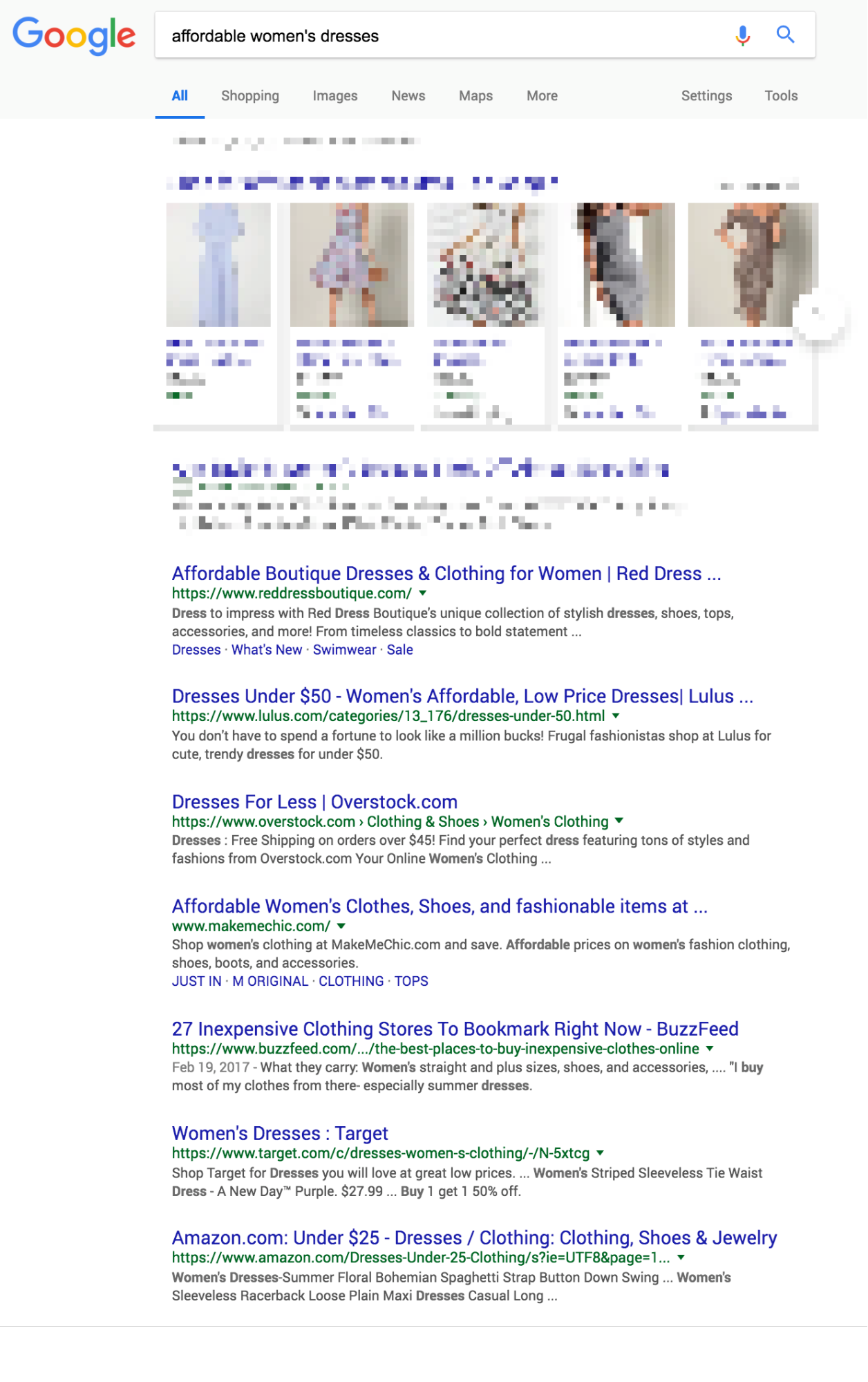
When Red Dress Boutique decided to replatform, the company worked with Visiture, an ecommerce search marketing agency, from the beginning to complete a comprehensive audit and consultation prior to the migration. The Red Dress Boutique team adopted the agency’s technical SEO recommendations, like …
Carefully considering 301 redirects to retain organic traffic
Diligently checking that meta descriptions carried over
Paying attention to changes in the website’s robots.txt file and XML sitemap generation to ensure that unnecessary pages didn't get indexed and impede crawl efficiency
“Executing on each action item is one of the ingredients that made this platform migration so successful,” says Dana Harbour, Founder of Red Dress Boutique.
Google Incognito results for “affordable women’s dresses”
Just months after replatforming and implementing their SEO maintenance strategy, Red Dress Boutique reduced its annual costs by over $100,000 while also achieving double-digit sales growth.
2. Minimize On-Page Changes
It can be tempting to change everything at once as part of the replatforming process. You’re already changing platforms, so why not all of the content and design, too? However, Wright warns that if Google has been crawling your site for a while then a dramatic change to everything from the words and images on the page to your site architecture will be “noticed” by the search engine, and can lead to a reindex and an unfortunate dip in your organic traffic.
No one knows exactly how search engines determine the top rankings, but many SEO experts suggest to keep your site as identical as possible after you replatform to preserve your current rankings. Paul Rogers, an ecommerce consultant at Vervaunt says that he’s seen ecommerce businesses lose “~50% of their organic traffic and revenue” because they overlooked and undervalued the technical SEO impact. That includes forgetting to:
Mirror the structure of the website — ensuring all categories and even any non-primary pages receiving traffic are retained on the new site
Review how dynamics pages are handled, such as filter pages, search pages, and pagination which require consideration as to how you want them to be crawled and indexed on the new site
Likewise, remember that the fewer aspects of your site that are changed during the replatforming process, the easier it’ll be to identify the root cause of any SEO fluctuations that happen because you will have a baseline from which to begin your measurement. It’s as important for testing SEO performance as it is for improving your overall conversion strategy.
One month after relaunching with the help of its digital marketing agency, Insterstellar, BackJoy achieved a 101.88% increase in sales from organic traffic. As part of the SEO strategy, the agency focused on making it easier for search engines to index the site, and worked with the BackJoy team to run a number of tests with the goal to convert more of the site’s newfound organic search traffic, including …
Landing page and traffic source combinations
Product bundles to lift sales
Six months after BackJoy’s organic search traffic tests, the site achieved a 22.11% lift in conversions. “The conversion rate numbers are really good and are constantly getting better,” says Tre Vertuca, BackJoy’s President and COO. “We’re glad we can do a lot of this on our own now but we’re also grateful to Interstellar and their expertise.”
3. Monitor Duplicate Content
“SEO is mostly about content,” advises Wright. While technical components can and do impact SEO, your platform should handle the basics which allows you to focus on creating content that attracts and converts your buyers. If you have multiple shops or a multi-domain strategy, you’ll need to have your team expert, an agency partner or platform launch expert work through how to transition your content and ensure that technical changes are well planned out.”
One reason why is that search engine algorithms aren’t always the biggest fans of duplicate content. Of course, it’s not always possible to avoid. There are many reasons why your site might have duplicate content, including:
HTTP and HTTPs: Most software-as-service platforms default to HTTPS (Hypertext Transfer Protocol Secure) and should issue an SSL for every shop’s domain. If you miss a redirect from HTTP to HTTPS, HTTP version would be accessible and would be hosting duplicate content.
Subdomains versus TLD: Using a number of Top Level Domains (TLD) means that you as a domain administrator also need to put in the extra work to inform a search engine that your two, or many, domains are related. Subdomains imply that to the search engine.
Dev environments: whether you host your own dev shops or use additional stores for staging be sure they include a no index tags. In the event that you remove the password on the development shop, you don’t want that indexed by a search bot.
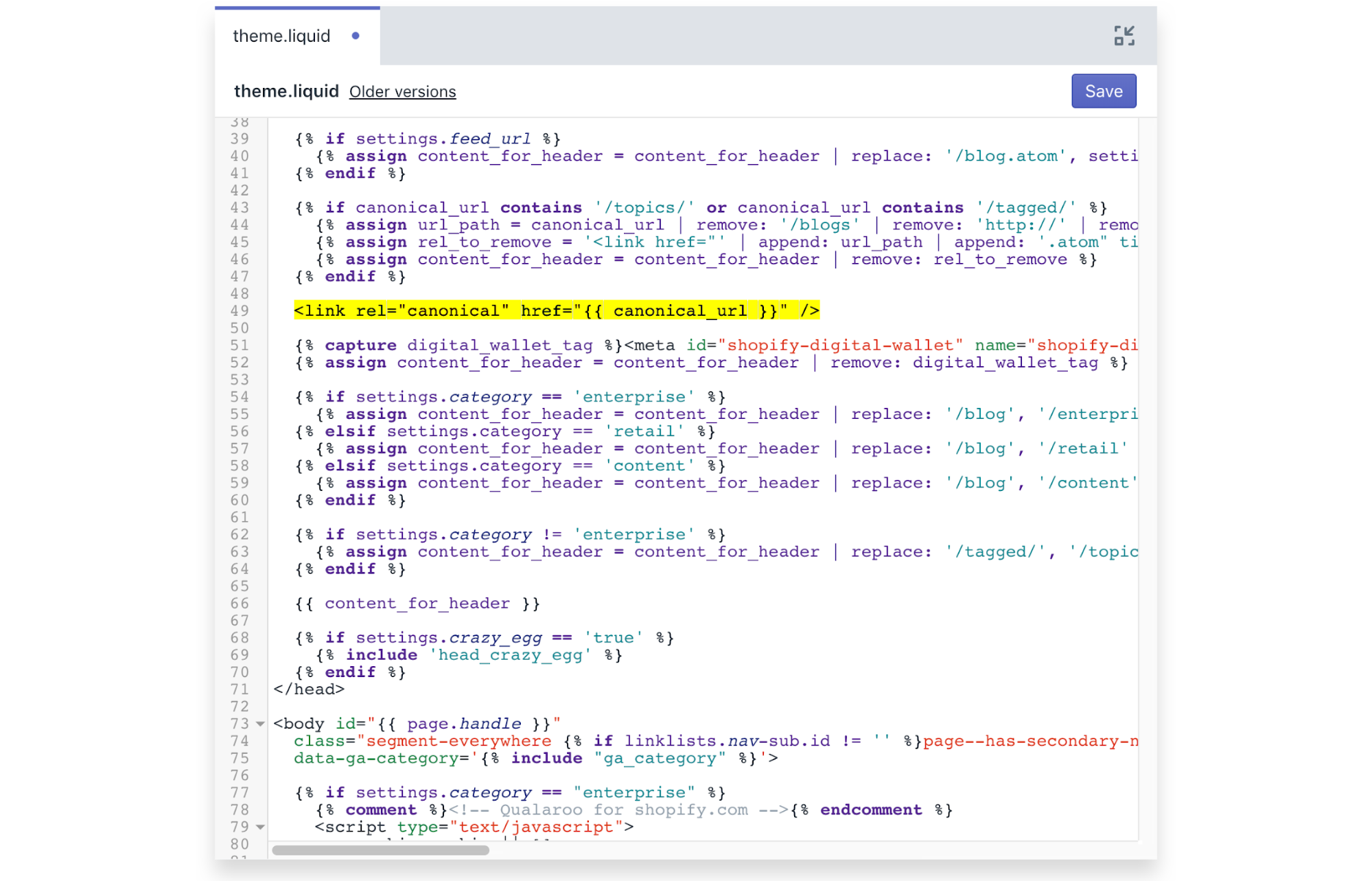
In many of those cases, you should use canonical URLs (e.g., the most authoritative URL you want search engines to see) to direct search engines to the original content. “Canonicals basically say to Google, ‘Hey, if there is more than one result, I want you to pick this one,’” explains Wright. On Shopify, canonicals are set by default to help manage any duplicate content issues that happen over time. However, they are still editable to accommodate advanced SEO strategies.
Also, if you have dynamic pages that display different content each time they’re viewed, make sure they’re not indexable. These steps ensure that your most valuable pages won’t have to “share” diluted rankings, and you won’t be penalized for duplicate content.
4. Track 404 Errors Rigorously
Replatforming is a great time to identify and resolve all of the 404 errors on your site. Doing so will help to boost your organic rankings after you move over to the new platform.
Unable to scale its SEO strategy with its old ecommerce platform, The Emazing Group replatformed with help from Traffic Control — an integration that allows merchants to automatically generate unlimited redirects. This enabled its ecommerce team to fix years of “404 error pages”: 650,000 pages, to be precise.
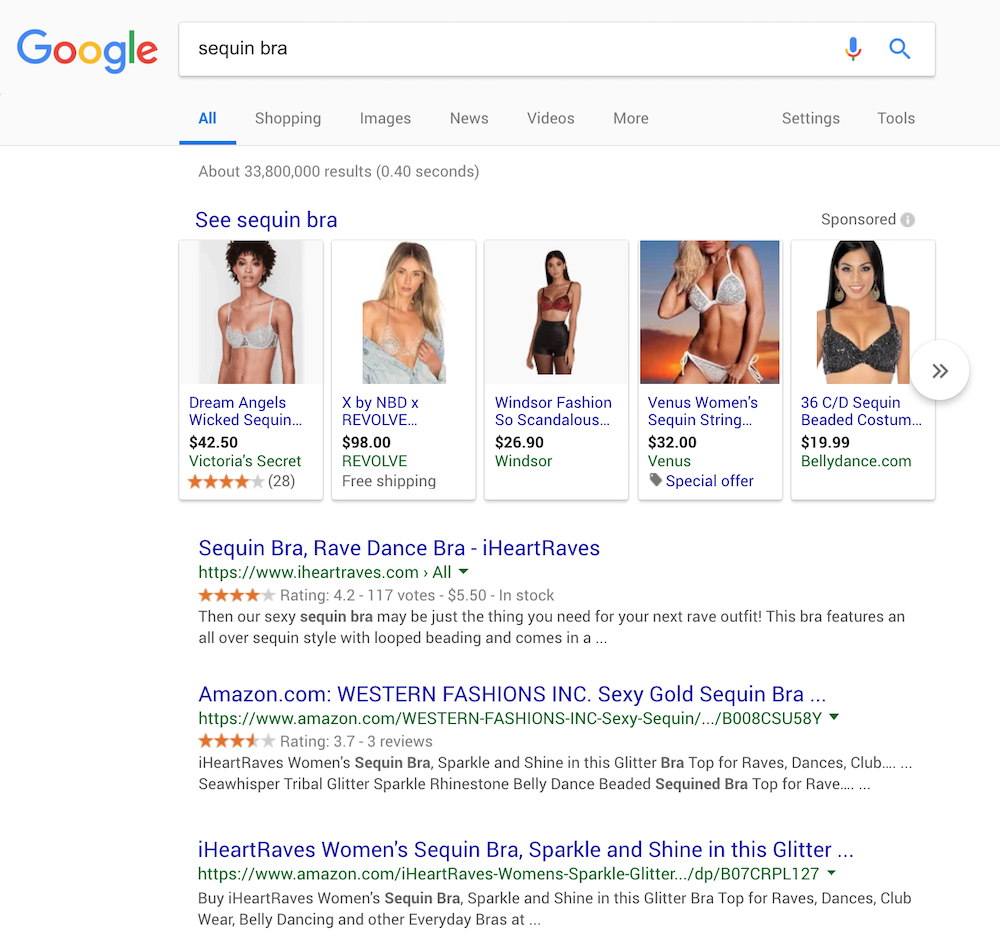
And, as all of its brands’ sites moved, the company found it easy to optimize page titles, meta descriptions, SEO-friendly URLs, and their internal linking structure. Even more important, the company’s SEO strategy resulted in 130% YoY organic traffic increase, and 22.59% increase in conversion rates which resulted in a 227% revenue increase, or $98,000, for an average month via its iHeartRaves brand.
Google Incognito results for “sequin bra”
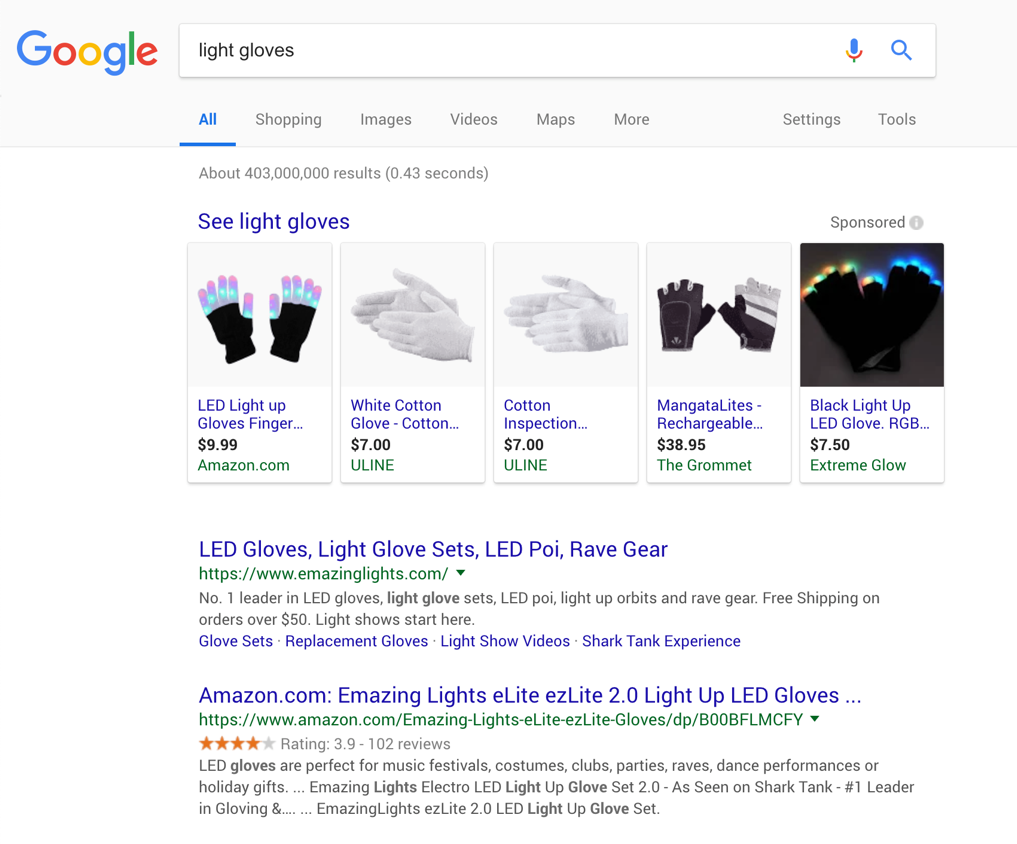
Similarly, EmazingLights now ranks number one for a number of sales-driving keywords:
Google Incognito results for “light gloves”
“We were able to lock down top spots for some of our most valuable keywords, bringing in new customers and more revenue than ever before,” says Katie Knoll, Digital Marketing Manager at The Emazing Group.
5. Make It Mobile, Make It Fast
At the end of March 2018, Google announced that the company has officially prioritized the mobile version of a site’s content to rank pages. Carla Wright explains, “This approach is called mobile-first indexing, which means that Google will use the mobile version of a page for indexing and ranking to better help their (primarily mobile) users find what they’re seeking.”
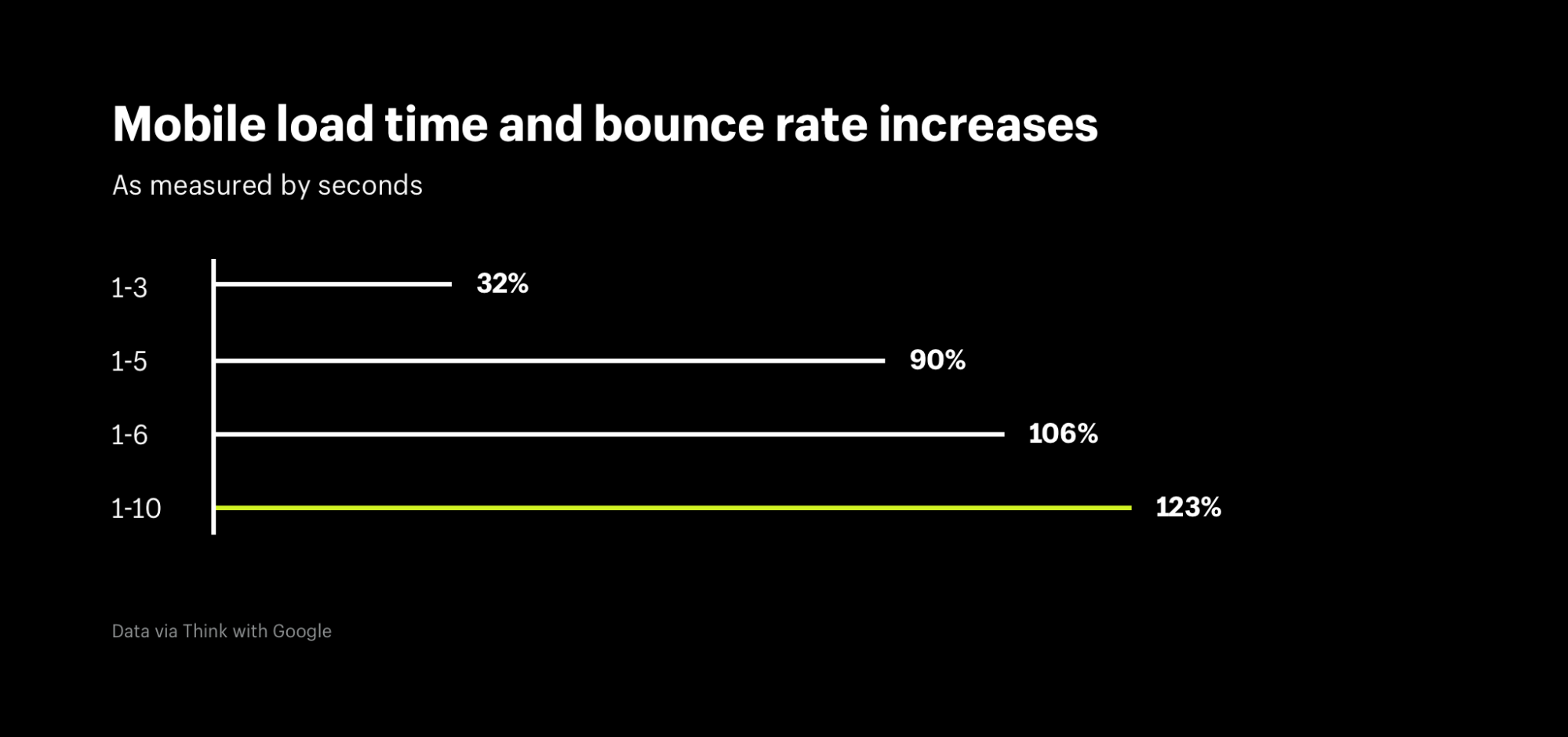
But there is another factor on your ecommerce site’s mobile pages that you must prioritize — waiting for a slow loading page that you clicked on from a search result using your smartphone can be extremely irritating.
Google scores page speed in aggregate as part of your ecommerce site’s search engine rankings. The company recently trained a deep neural network — “a computer system modeled on the human brain and nervous system” — and discovered an enormous jump in bounce rates based on mobile load time. Having a fast, mobile-first SEO and ecommerce website strategy is now a “must-have” to provide an optimal customer experience.
In the case of PWAs (progressive web applications), Chris Love — a PWA and SEO expert — recommends that you render as much of your HTML on the server side first, “as a static web page. Then either rendering on demand server-side as much as possible and leave the last bit for client-side rendering.” Following this approach will ensure that your pages will index faster and be directly linkable.
He adds that you shouldn’t use heavy JavaScript to render your pages in the browser either. “When it comes to pages that need to be indexed and ranked by Google this means almost 100% of the page should be pre-rendered on the server. Google likes this because it can consume the content and score the page for search results,” he says.
Another option is to use accelerated mobile pages (AMP): an open-source project (sponsored by Google) that enables content on mobile websites to render almost immediately. The important word in that last sentence is content. To be AMP compliant many features that ecommerce stores rely upon — namely, advertising tags and JavaScript — must be disabled. Moreover, you can only use Google-approved HTML and host the page on Google infrastructure.
Nonetheless, AMP ought to be considered based on your needs. “Google-sponsored research shows that AMP leads to an average of a 2X increase in time spent on page. The data also shows ecommerce sites experience an average 20 percent increase in sales conversions compared to non-AMP web pages,” says Eric Enge, CEO of Stone Temple Consulting. Because the AMP code is open-sourced, merchants can use accelerated mobile pages either on Shopify or through their PWA.
6. Optimize After Replatforming
With constantly changing algorithms and updates, SEO should be a permanent, ongoing part of your ecommerce growth strategy. So you’ll need to keep the momentum going after you make the switch. And even if your site is performing well, it can always do better.
Think of replatforming as an opportunity to perform an SEO-SWOT analysis (Strengths, Weaknesses, Opportunities, Threats) on your site, which can provide you with valuable insights on how to move forward.
You’ll also be able to evaluate how your new platform can help bridge any gaps. Of course, as mentioned above, be mindful of the impact of your changes and their timeline as they relate to the physical migration process of your ecommerce site.
For further SEO growth opportunities, ask yourself these six questions:
Is my content valuable and helpful to readers? As Carla Wright mentioned earlier, this is the most important factor in your search engine rankings. This post explains how to maximize the success of your product descriptions to build on the success you’ve already achieved.
Does my site use meaningful and targeted keywords? The more relevant they are to a user’s most specific searches, the better.
Does my site use HTTPS? It stands for HyperText Transfer Protocol Secure which is an important trust signal for customers who give you private information or credit card information. In 2014, it became a ranking factor, and every domain on Shopify has an SSL certificate issued for it. Shopify Plus also gives you an EV certification which is often overlooked.
Are my URLs short-and-sweet at 75 characters or less, containing my keywords and using only alphanumeric characters? URLs are less important for keywords than they were five or so years ago. However, it’s important to ensure they are as straightforward and driven by the most relevant keywords for each product or page.
Are my directory structures simple, with three or fewer levels of depth? “Behind the scenes, sites can use specific markup (code) that makes it easy for search engines to understand the details of the page content and structure,” says Wright.
Finally, James Corr, Owner of Only Growth advises that you resubmit your new sitemap to Google Search Console to ensure Google reindexes your new site after you replatform. He says that you can expect to see a 5 to 10% drop in traffic in the first month, which is normal as search engines re-analyze your site over several months. As long as the percentage of web pages indexed continues to increase, then you know you are on the right track.
Seize Your Replatforming Opportunity to Improve SEO
Although the thought of replatforming can be scary, it’s important to consider all of the positive outcomes that result from investing the time to do it right. One of those opportunities is that it is a great time to improve your SEO.
The tips in this post are more than enough to help you get started. But if you’d like more, we recently released our most-detailed guide to ecommerce migration and replatforming ever … be warned: this behind-the-scenes and hands-on look isn’t for the faint of heart.
Instead of a surface-level sales pitch, it includes everything you need to know about large-to-enterprise migration.
https://www.shopify.com/enterprise/replatforming-seo-strategies
Internal links are links between pages on the same site. For example, a link from your site home page to service page or links from your site product page to similar product pages.
In short, internal links are links within the site and not pointing outside of the domain.
An internal link is a type of hyperlink on a webpage to another page or resource, such as an image or document, on the same website or domain. Hyperlinks are considered either "external" or "internal" depending on their target or destination. Generally, a link to a page outside the same domain or website is considered external, whereas one that points at another section of the same webpage or to another page of the same website or domain is considered internal. Wikipedia
Unlike other SEO factors, internal link has double effect on a website. Firstly, it influences user engagement metrics, including time spent on website, page views per session, and conversion rate. And secondly, internal link has significant ranking importance that can boost any site organic position in the SERPs.
Importance of Internal Linking
In SEO and Technical Side, Internal linking has four main purposes:
In website navigation, internal link help user find more pages in the site.
Internal Link Help Defines the Website Architecture and Hierarchy.
Internal Link Pass Page Authority and Ranking Power Throughout the Site.
Internal Link help search engine spider discover more pages on a site.
13 Ways to use internal links to improve your site rankings
1. Create Lots of Content.
In order to create internal links, you have to have lots of pages and posts. The first step is maintain a internal linking strategy is to have a killer content marketing strategy. You can’t have one without the other.
When you create lots of content, you’ll have lots of content for Internal Linking. The more links to Pages and Posts, the better your internal linking strategy will be.
Some internal linking strategies propose extremely complex layers of pages, silos of content, and a mathematically-balanced formula for number of links to levels of pages. I say it doesn’t really matter. Internal linking doesn’t require organizational spreadsheets and trigonometric derivative charts.
An internal linking strategy with lots of content looks less like an org chart, and more like this:
There are no “cycles.” There are no “silos.” There are no “tiers.” There are no structured flow diagrams. There’s just plenty of happy links going to helpful places.
2. Use Relevant keywords in the anchor text.
In keeping with the your website content theme, your internal links should only use anchor text - not images or any other media files. Image links are fine, provided that images are not the main source of links, and assuming the image is properly alt-tagged.
The use of anchor text for internal linking might not look natural. So, don’t use optimized anchors. Just use natural, un-optimized sentence fragments as anchor text, and you’ll do just fine. No cute tricks. No overthinking it. Just highlight the text, link it, and done.
3. Link deep.
The deeper your links go, the better. There are two types of internal links you should avoid:
Homepage. Most sites have too many links to the homepage as it is. You would rather strengthen internal pages to boost the overall SEO of your site, rather than simply point more links at the homepage.
Contact us. This is a common mistake of many who are starting out in content marketing. As part of their obligatory call to action at the end of a post, they may write something like, “Give us a call to find out more about our awesome services!” Then, they link to the “contact us” page using the anchor “give us a call.” Don’t link to the contact us page unless absolutely necessary.
In Essence, you should avoid links to the top level pages on a site — pages to which the main navigation menu already has links.
The Best links and the most natural links in a content marketing strategy are deep within the structure of a site.
4. Use links that are natural for the reader.
Internal linking requires a user-focused approach to adding value and information. The link value that gets distributed throughout the site is secondary to this key point providing value to the site visitor.
One of the corollary benefits of internal linking is that it improves user engagement on your site. When a user sees an informative link that truly matches the context of the content, they are likely to click on that link. It can be an external link, as long as it’s something that the reader will be interested in. If that link is an internal one, the site visitor stays longer and becomes more involved in your website experience.
When you link in your content you’re telling the search engine that the target of your link is so relevant and important that you want your visitor to simply be able to click a link and go straight there. Basically, that what you’re linking to is potentially so relevant that the visitor may want to stop what they’re reading and go to the next page.
Content links are a strong signal to both the search engine and the user that the content you’re linking to is really good. Readers want that. Thus, internal linking is helping the reader. But you’re also helping your SEO.
5. Create Only When Relevant.
Internal linking, as I’ve made clear, is less rigorous and scientific than some might think. But you still have to be intentional. Don’t merely link for the sake of linking. Instead, link to content that is relevant to the source context.
In other words, let’s say I have a page on my site about dog food. And, I have a page on my site about the nesting habits of parakeets.
Should I link the two pages?
There is not a strong connection between dog food and parakeet nests, especially on a superficial level. These two pages probably won’t provide mutual enhancement from internal cross-linking.
But, if I have a page on parakeet food, then it might make a great internal link for my parakeet nest article. Chances are, information about “parakeets” is going to be on both of the pages. Because of this content overlap, the link is relevant.
As much as possible, link to relevant content in your internal linking.
6. Use do-follow links.
Do-Follow links are the best way to build out the internal link architecture of your content marketing.
One theoretical internal linking strategy of the past was to no-follow most of the links on a page, in order to increase the link juice to a single page. This type of pagerank sculpting doesn’t work as an SEO strategy.
Back in 2005, the search engines came up with the no-follow, known by the attribute rel=nofollow. The idea behind no-follow was that the link “should not influence the link target’s ranking in the search engine’s index.” As Wikipedia stated, such links would “reduce the effectiveness of certain types of internet advertising because their search algorithm depends heavily on the number of links to a website.”
Despite the uproar and confusion in the wake of the no-follow link, most people now agree that it’s a good idea. As Danny Sullivan explained, no-follow links can help sites “avoid problems with search engines believing they are selling influence or are somehow involved in schemes deemed as unacceptable SEO practices.”
In spite of its value, however, using no-follow links is not a strategy you should be using as part of your internal content links. The link value needs to flow freely to and from internal pages, rather than get stopped up by a no-follow. Keep things free and fluid.
7. Use a reasonable number of internal links.
You don’t need tons of links in your internal content. Google’s instructions are simple: “Keep the links on a given page to a reasonable number.”
What the Heck is a Reasonable Number?
Answer is Simple Nobody Really Knows.
Smart people have tried to answer the question, but not even Matt Cutts has provided a definitive statement. He wrote, “It seemed about right to recommend 100 links or so,” and “in some cases, it might make sense to have more than a hundred links.”
So, should you go for 100 links? Maybe, but that 100-total links includes all the links on a page — footers, headers, nav bars, ads, everything. 100 links isn’t as hard as it sounds, once you calculate the total number of HREFs on an entire page.
When it comes to internal linking, I suggest around three to four, depending on the length of your post. I usually write articles that exceed 1,500 words, and I don’t have a link-heavy navigation bar. So, I wouldn’t feel bad about throwing in ten or twenty internal links if I needed to.
There’s no magic number. There is however, the all-important user. Add as many links as would be helpful for the user.
8. Make sure all the important pages are linked.
These days, search engines rely both on sitemaps and links to discover web pages. It means that even unlinked or the so-called 'orphan' pages can be found by the search engines as these pages are listed in the sitemap.
But it's impossible to find 'orphan' pages through the website's navigation. Such pages virtually don't exist for the users. It's a good idea to get rid of orphan pages; you can either delete them (if they are useless) or link them from other pages of the website.
Landing pages that are created for pay-per-click campaigns are an exception. They often act as independent website areas that are not linked from the main website's content and are normally blocked from indexation.
9. Make sure image links have alt attributes.
The alt attribute of image links acts like anchor text for text links — so it's another opportunity to send a ranking signal to search engines.
So, Make sure image links have alt attributes.
10. Mind duplicate links to the same URL.
If there are several links on the same page that point to the same URL, search engines would give the priority to the first anchor text.
Keep this in mind and use the right keywords in the first link's anchor: subsequent anchors won't matter as much.
11. Place links within pages' main content.
The links placed within a page's content have a higher SEO value than the ones in the header, footer, or sidebar. The latter have more to do with navigation, and it looks like Google treats those as non-editorial links.
Links in the main content, on the other hand, add new information and value to the text. Furthermore, the text and keywords surrounding a link also matter for the ranking of the target page.
On the contrary, if you force links with additional information to open in a new tab, it's easier to go back to the original piece of content.
In order to force browser to open a link in a new tab, add a 'target' attribute to the link in HTML:
However, remember to avoid this tactic when you channel users through a conversion funnel. In this case, links should be opening in the same tab.
12. Point links from traffic pages to conversion pages.
Many companies run a blog to create "engaging and useful content". Some of them achieve the goal, and their posts attract significant traffic. The problem is that a blog post can rarely boast a high conversion rate.
Why not channel users from high-traffic blog posts to landing pages that are specifically optimized for conversion?
13. Keep it Natural.
This strategy implies that you don't care about the number of internal links, their anchors, or any SEO tricks. You just follow common sense and create links to the content that may be helpful to your users; as simple and elegant as that.
In practice, it means that you should only keep in mind the internal linking best practices that I mentioned in this post.
Google updated their search results algorithm in late June, and over the holiday weekend. A significant Google algorithm update happened on June 25. This update has had webmasters and SEOs buzzing in all past week about the significance of its effects on websites across the world.
Not all the tracking tools are showing massive changes. Mozcast has been overheating for the past couple months now, SERPMetrics seems to have declined a bit, Algoroo is somewhat calm now, Accuranker shows activity, RankRanger is showing major swings and SEMRush is also showing major changes.
Google's June 25 Algorithm Update - High Fluctuations, Low Chatter
Despite the length of the current update, the initial chatter, per Barry Schwartz of SERoundtable, was quite light. This is obviously peculiar, not only in light of the length of the update, but the fluctuation levels themselves as well. The risk levels on our Rank Risk Index have risen above moderate, and show a continuous series of high fluctuation levels.
With rank fluctuations being what they are, a voluminous degree of chatter would be the norm, or at minimum the expectation. What then is behind the slow development of industry chatter in this instance? This question, oddly as it may be, plays a significant role in understanding (of course partially, as only Google knows the full picture) what transpired with this update.
It’s no secret that Google updates its algorithm often, and based on what we’ve seen since 2000, it will likely continue to do so for years to come. If you’re noticing the reduction of impressions in Google Search Console over the default view of 28 days, expand the range to 90 days.
June's Algorithm Update Ranking Positions Hit Analysis
RankRanger, another tracking tool, provided further analysis of the June 25 update in a blog post published today. The company says this appears to be a long running update, the likes of which has not been seen since October 2016.
Analysis from RankRanger indicates Google’s recent algorithm update primarily targeted sites that were ranking in positions 6-10.
Top 3 Results - Exact Match (%)
Top 5 Results - Exact Match (%)
Top 10 Results - Exact Match (%)
RankRanger also broke down its analysis by niche. While there were fluctuations across all niches, the food & beverage industry appears to have been hit the hardest. This is followed by sites in the health & fitness, gambling, retail, and travel niches respectively.
Google's June Update - What You Should Do Now
Being able to accurately identify the root causes plaguing your website can seem like a scary proposition for some. Using the scientific method can help you figure out whether you have a big SEO problem.
For those who want to know, How to tackle this situation, follow this guide:
Does organic click-through rate (CTR) data impact google rankings? This has been a huge topic of debate for years within the search industry.
Several tests seem to have shown that the click-through rate Influence the Google Organic Ranking. A new test seems to show the opposite. Who to believe?
According to Rand, Click-through rate is a Ranking Factor
Rand Fishkin ( co-founder of Moz.com ), has several times used moz's large subscribers (mainly via social networks) to carry out SEO Tests. A test in July 2015 seems to have shown that the Organic CTR (Click-through rate) Improve Google Search Ranking, and that a better CTR led to a better position in search.
But be careful, his test was biased, like all tests, and the CTR was not the only variable. He talked about this again in a video referring to a patent you should read. He had already been interested in this in 2014.
According to Bartosz Góralewicz, Google no Longer Uses CTR in Their Ranking Algorithm
Bartosz Góralewicz conducted a test in March 2015 to try to prove the same, but he came to the opposite conclusion! According to Bartosz, Google no longer take into account CTR in their Organic Ranking Algorithm. You can read hiss explanations on Search Engine Land (as well as in more detail on its own site ).
In summary, Bartosz used click bots, which simulate users doing Google searches and clicking on results. He explains that he had trouble getting there, but after weeks of work he could simulate visits that Google apparently did not identify as Bot user. To prove this, He shows that the visits were recorded in Google Analytics and Google Search Console (which is not easy for simple clickbots ). And most importantly, he was able to influence Google Trends and Google Ad Planner. In his conclusion, he believes that it is finally safe to tell that that Google has abandoned CTR from their core algorithm, because this metric can be easily manipulated.
According to Google, CTR is not a Ranking Factor
Besides, Gary Illyes ( Webmaster Trends Analyst at Google ) said in 2015 that Google do not use CTR as a Ranking Factor.
My Personal Opinion
Well then, if Google does not use CTR as a Ranking Signal, why other tests have positively shown Organic CTR Does Improve Google Ranking? And why do we read That Higher Organic CTR Lead to Higher Position on Search Engine?
Here are some thoughts I would like to share with you about tests I Mentioned Earlier:
Rand's Test Conducted By Real Human Users: Real Human Google Visitors, with Browsers cookies enable. Conversely, the experiments of Bartosz were made with software. Although he ensured that google were unable identify this as artificial visit, But it does not prove that Google's algorithm has not "decided" to ignore these types of queries and clicks. In reality, it seems probable that Google checks if the CTR increases for people not connected to their Google account as for others (Ditto for many other things such as the type of desktop / mobile device, Operating system, browser, etc.).
It is also possible to surmise that the actions performed by human visitors at Rand's test to increase the CTR have involved other criteria which may also influence the search ranking.
Bartosz conducted the test for a short amount of time (2 weeks if I understood correctly). In my opinion, to improve the CTR results in improved positioning, it takes a much longer period. And if one day there is a peak of traffic (it can happen, buzz or other), the CTR must keep high after that, otherwise it does not confirm the interest of Internet users.
What is Your Opinion About Organic CTR Impact on Google Ranking?
If you having issue with 404 Error in Google Search Console, this tutorial is for you! Follow the Steps to Improve your Website Usability and Organic SEO.
The Framework is as Follows: Despite your efforts, Google lists 404 errors (And other types of HTTP Errors) in the "Crawl Errors" report in your website Search Console Account.
Is 404 Error Bad For My Website?
How to correct them and make HTTP Errors disappear from GSC?
Do 404 Errors Bad For My Website SEO?
Here are the explanations provided by Google:
In general, 404 errors do not adversely affect your site's performance in search results, but they can help improve the user experience.
In the help, you will find additional tips:
They often occur as a result of typos or configuration errors, for example in the case of links generated automatically by a content management system. They can also be the result of the growing development of our services to detect and explore links in integrated content such as JavaScript.
This last sentence is not very clear, but basically we understand that Google sometimes seeks to access URLs that simply do not exist, but its interpretation of JavaScript codes makes Google believe that these URLs may exist.
I End with the latest tips from Google about 404 error:
It is quite normal, even desirable in some cases, to encounter 404 error codes on the Web. You will probably never be able to control all links that redirect to your site or resolve any 404 errors that appear in the Search Console. Focus on the most important issues, solve the problems you can, then move on to another step.
So? The purpose of my article is precisely to help you understand 404 error impact on organic seo and how to fix them.
My Point of View:
If a user land 404 page by clicking search engine organic result then you should fix the link ASAP. Because this 404 error (404 or other) will negatively impact your website search ranking.
If a page is in error 404 because of a link coming from other website, you can do nothing and it does not degrade your SEO performance. But if the link is coming from quality site, as long as it landing in a broken page, you're not getting any seo advantage of this link, so you should correct the link.
If you have too many 404 errors in your internal links, it degrades the user experience so you should fix them to improve user experience.
Steps to Fix 404 Errors
In your place, I would follow these steps.
Step 1- Fix 404 Errors Generated by Internal Links
If 404 errors are caused by internal links, they must be corrected because:
These errors degrade the user experience
These errors interfere with your SEO since a page does not receive the link you had planned to make
It's easy to detect and correct :-)
It will do a first cleaning of the list of errors 404 indicated in Search Console
Step 2- Fix 404 Errors Generated by Sitemaps
Use an HTTP header checker tool to check that each and every URL in your Sitemap actually returns a 200 status code (which means everything is OK). There should be no redirection.
Some 404 errors may be linked to backlinks, that is, links from other sites, pointing to a wrong URL on your site. To identify them, use your favorite backlinks analysis tool (Majestic, Ahrefs or Moz) and retrieve the list of backlinks pointing to a 404 error. Majestic has published an article on this topic, it's up to you to exploit it for your own Site instead of that of a competitor. If you do not arrive at all, and you ask me kindly , it is possible that I will do it for free ;-)
If the one who made the link was slightly mistaken in the URL, it is a pity and it must be corrected:
Contact the webmaster of the site that makes you the link in error to ask him to correct it. Introduce him in a positive way by explaining that he has a broken link on his site ...
If it does not respond, set up a 301 redirect from the wrong URL to the right one
Step 4- Fix other HTTP Errors
Once you have validated the previous steps, wait 1 or 2 weeks for Google to update your Search Console account. Next, see the Crawl Errors report, click the "Not Found" tab in the "URL-level Errors" sub-section.
Google lists Errors in Order of Priority, so enjoy.
If it's easier for you to manage the list in Excel, simply download the table in CSV format (or Google Docs). In the case of CSV, here are the columns that you will retrieve:
URLs
Response code: 404 for pages not found
Google News error: only applies to sites in Google News
Detected: date of first detection by Googlebot (the robot of Google)
Category: error type (here "not found")
Platform: Googlebot version encountered error (computer, smartphone or multimedia phone)
Last exploration: date of last crawl by Googlebot
Depending on the different cases that remain listed, you may need to repeat one of the previous steps. To see more clearly, you can check the box in front of the URL processed and click on the button "Mark as correct".
Tip : If you have a lot of errors, you may get to the limit set by Google, which is 1000 URLs. To circumvent it, simply declare a subpart of your site as a new property in Search Console. This technique works only if you have directories at the root, for example / blog /. In this case, you can declare http://www.example.com/blog/ as a new property; It will be validated immediately and you will be able to consult the list of errors 404 concerning only this directory. Convenient !
Redirect to the Reception: bad solution!
I still regularly encounter badly configured sites, on which in case of page not found we are redirected to the homepage. Do not do that!
Indeed Google's online help confirms that a web server must return a 404 code when a resource can not be found:
It is quite normal, even desirable in some cases, to encounter 404 error codes on the Web.
You may have configured a custom 404 error page (that's fine). However, check that the HTTP returned is a 404 code, and not 302 (temporary redirection). Use an HTTP code test tool on a non-existent URL on your site. If you have a 302 redirect, you may have specified an entire URL in your .htaccess file for the custom error page.
How often should you check for 404 errors?
You should be checking your 404s at least once every month and on a bigger site, every week. It doesn’t really depend on how much visitors you have but much more on how much content you have and create and how much can go wrong because of that. The first time you start looking into and trying to fix your 404 error pages you might find out that there are a lot of them and it can take quite a bit of time. Try to make it a habit so you’ll at least find the important ones quickly.
Need Help?
If you do not get there or something is not clear enough for you, feel free to ask the question in the comments











 Google updated their search results algorithm in late June, and over the holiday weekend. A significant Google algorithm update happened on June 25. This update has had webmasters and SEOs buzzing in all past week about the significance of its effects on websites across the world.
